
What the checker probably saw
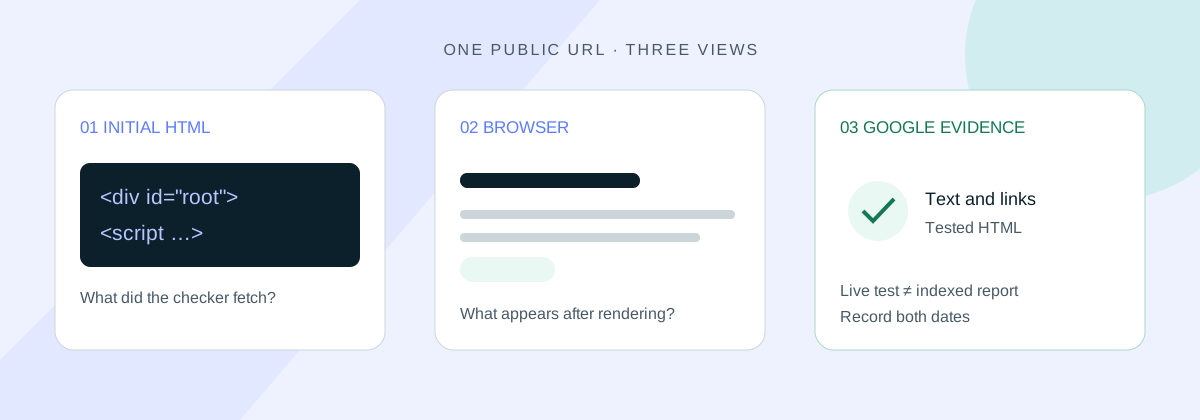
On an older Lovable site, an SEO checker can receive a nearly empty HTML page while a verified search crawler receives a rendered copy. That difference can explain an “empty page” warning even when the website looks complete in your browser.
Lovable’s hosting documentation explicitly warns that scanners may report this. Its SEO documentation also mentions verified SEO tools receiving rendered pages. Neither names the tools covered, so check how your scanner tested the page before accepting its conclusion.
The useful question is whether your published content reaches Google. Start with one affected URL and compare the evidence below.
Which kind of Lovable site do you have?
Lovable documents two setups: newer TanStack Start projects use server-side rendering; older React and Vite projects use pre-rendering for verified crawlers. In plain English, the newer setup prepares page content on the server for ordinary visitors too. On the older setup, a visitor’s browser builds the page from JavaScript.
Ask Lovable to identify your current framework and the file that confirms it. Project age alone is unreliable because older projects can be upgraded. Also confirm the actual host: Lovable’s delivery rules describe its own hosting, not an exported app running elsewhere.
On a server-rendered project, an empty result calls for a different investigation: a page error, missing data, browser-only content or a blocked request. Record the response and any errors before changing the setup. Use the custom-domain guide if the browser and checker used different addresses.
Check the page yourself
Choose one public page. Write down two distinctive sentences and an important internal link. Use that exact URL throughout, including the same hostname and path.
- View page source. On a desktop browser, right-click and choose View page source, or put
view-source:before the URL. Search for your sentences. This shows the HTML sent to that browser before JavaScript builds the page. - Inspect the loaded page. Open the public URL without signing in, then right-click and choose Inspect. Search the Elements panel for the same text and check the link’s destination. This view includes changes made by JavaScript.
If the text appears only in Inspect, the browser has added it after receiving the HTML. A source-only checker can miss it. Ask whether the checker runs JavaScript and whether it successfully finished loading this page.
Changing a request’s user-agent to “Googlebot” is not evidence that Lovable treated it as a verified crawler. Lovable does not explain its verification method in these guides. Use Search Console rather than assuming a renamed request reproduces Google’s access.
Google’s JavaScript SEO guide explains how crawling, rendering and indexing fit together.
Ask Google what it sees
Open the correct Search Console property and paste the full URL into the inspection bar. There are two views to compare:
- The indexed result: check the last crawl date, indexing status and Google-selected canonical. Where available, open View crawled page and search its HTML for your reference text. This records a previous crawl, so note whether it predates your latest changes.
- Test live URL: run a fresh test, then open View tested page to inspect the HTML, screenshot and resource information. Search for the same sentences and links. Record the test time and any errors.
The live test uses Google’s inspection tool. It shows what that tool can fetch now, rather than confirming what is indexed or predicting Google’s chosen canonical. Google explains the distinction in its URL Inspection help.
If the screenshot looks incomplete, read the HTML too. Check whether the useful text and links are present, rather than expecting every visual effect to match. If the URL redirects, record the destination being tested.
What the results mean
- Text in the browser and Google’s HTML, but not the source: this supports a difference in delivery or rendering. Check the scanner’s method and a few other important pages before calling it a site-wide fault.
- Text in the browser but missing from Google’s tested HTML: investigate failed requests, loading delays and access restrictions. Give your builder the URL, missing sentence, test time and errors.
- Text missing from both: check that the correct page and data were published. Fix the broken public page before polishing metadata.
- A timeout, challenge or error: treat this as an incomplete test. It has not established that the page contains no content.
If Google can render the content but the page remains unindexed, move to the indexing guide. For missing content or failed resources, use Google’s JavaScript troubleshooting guide.
Worked example: a cleaning company’s service page
This example is invented, not a client case. A cleaning company receives an empty-page warning. Its page source contains scripts and a root element, while the browser displays the service description, including “Our team cleans shared office spaces”. The project uses React and Vite on Lovable hosting.
The owner inspects the same URL in Search Console. If the sentence and service links appear in the live tested HTML, they record the difference from the scanner’s result and check the indexed report next. The warning alone gives them no reason to rebuild.
If the sentence is missing from the tested HTML, they send their builder the URL, sentence, test date and errors. They ask for a diagnosis, review the proposed fix and repeat the comparison after publishing it.
What to send your builder
Include the checker’s result and method, the exact URL, your reference text and the Search Console evidence. Remove private information from screenshots or excerpts. Then ask:
For this published URL, explain why the checker’s result differs from the browser and Search Console evidence. Identify the current framework and host, show the missing text and propose the smallest justified fix. Do not change hosting or rendering until I approve the plan.
The Lovable SEO review prompt helps with a broader project review. After changes, use the post-launch verification prompt to check the published result.
Before you change anything
- Save the exact URL, missing text and dated test results.
- Confirm the current framework, host and checker’s method.
- Compare the browser, live inspection and previous crawl.
- Ask for a diagnosis before approving changes, then retest.
For the rest of your launch checks, follow the Lovable SEO checklist. Our free single-page SEO checker offers another starting point; use Search Console for Google’s own crawl and indexing evidence.
Written by Andy Chubb. Sources checked on 2 November 2026: Lovable’s hosting and SEO documentation, and the Google guides linked above.