
First launch or an existing site move?
Connecting a domain makes your website available at a new address. It does not tell you whether the old address redirects, whether every page uses the new domain in its search information, or whether Google has indexed the new pages. Those are separate checks.
Start by deciding which situation you are in. A private development preview becoming a public website is a first launch. A public builder address that already receives search visits or backlinks is a site move. Replacing an established website at the same domain is a hosting or platform change, even if the builder calls it a new publication.
For a first launch, focus on making the final pages accessible and consistent. For a move, also record your old URLs and arrange a destination for each useful page. Keep the domain change separate from a major rewrite where possible, so you can identify the cause if something stops working. Google explains the distinction in its site-move guidance.
Record what you are changing
Before changing settings, save a short launch record: the current public address, your intended domain, the important page paths, and where DNS and hosting are managed. DNS is the set of records that connects a domain to services such as your website and email.
For an existing site, export the current sitemap and available Search Console page data. Note pages with enquiries, visits or links from other websites. These are your first verification targets after the switch. Save the old configuration and know how you would restore service if the new domain fails.
A domain connection should not require you to delete unrelated email records. Follow the hosting provider’s current instructions for the specific records it needs. Check HTTPS works before directing customers to the new address.
Choose one public version of each page
Decide whether your main address includes www. Either choice can work; the important point is consistency. Write down the final HTTPS address of your homepage and at least one deeper page, such as https://example.com/services.
Test the other versions as well: HTTP, the alternative www address, and any public builder subdomain. Check where they finish and whether the page path survives. A working homepage does not prove that a service page works when opened directly or refreshed.
Use the same final addresses in navigation, buttons, structured data and sharing information. Search your project for the old hostname to find hard-coded links, but review each result before replacing it: an API address or authentication setting may have a different purpose.
Check redirects instead of assuming they exist
For a permanent move, use server-side 301 or 308 redirects where your hosting supports them. Each old page should lead directly to its relevant replacement. A redirect sends the visitor elsewhere; a DNS record only connects a hostname to a service. They solve different problems. See Google’s explanation of redirect types.
Open browser developer tools, select the Network panel, enable Preserve log and visit an old page address. Inspect the first document response and its destination. Record the status, every redirect hop and the final page. Repeat for a deeper URL, not only the homepage.
Lovable’s custom-domain documentation currently describes 302 temporary redirects between connected domains when a primary domain is set. It also says permanent 301 redirects between those domains are not supported. Do not describe that setting as a permanent migration redirect. Test your project’s actual response and path handling.
If you cannot control the old hostname, ask the host what redirect options exist. A canonical can help indicate a preferred duplicate, but it does not move visitors. Prioritise consistent final URLs and update links you control; seek migration help if the old address has meaningful traffic or backlinks. Avoid adding a reverse proxy solely to obtain a redirect without understanding the extra hosting responsibility.
Remove old-domain canonicals and conflicting signals
A canonical tells search engines which URL you prefer for a page. On the new domain, an ordinary service page should normally name its own final address, not its old builder URL or the homepage. Check the actual published HTML as well as the builder’s settings.
For example, the service page at https://example.com/services should not declare https://example.com/ as its canonical simply because that is the site’s main domain. Google treats canonical declarations as signals and may select a different URL; they do not guarantee the outcome. Its canonical guidance explains how to keep these signals aligned.
Also check page titles, descriptions, social previews and structured-data URLs. A builder may update the visible address while retaining old-domain references elsewhere. Inspect several page types rather than assuming one correction applies everywhere.
Check search access and the sitemap
Confirm public pages are not behind a login and do not carry an unintended noindex instruction. Check both robots meta tags and the X-Robots-Tag response header. Read robots.txt for rules that block important public paths. Keep private and account areas protected.
Your sitemap should list the preferred final public URLs, not preview addresses or URLs that redirect. Open it on the new domain and test a few entries. Check that any sitemap address declared in robots.txt also uses the correct host. Google’s sitemap guidance covers creation and submission; a sitemap is a discovery aid, not a promise of indexing.
For a wider diagnosis, use our guide to why vibe-coded websites do not get indexed. Domain consistency is only one possible cause.
A worked example: preview to public domain
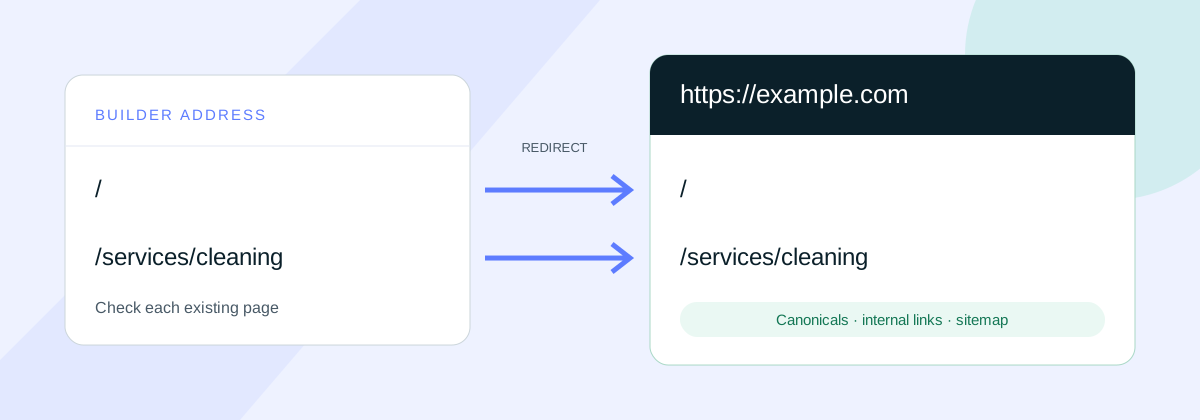
This is an illustrative example, not a measured client result. A founder has a public builder site with a homepage and a cleaning-service page. They want the same pages available at https://example.com.
- Inventory: record the old homepage and
/services/cleaning, including any known search visits or backlinks. - Connect: follow the host’s domain instructions, wait for HTTPS to work, then open the new service URL directly.
- Align: set the service page’s canonical to
https://example.com/services/cleaning. Update navigation, sitemap entries and old-domain references. - Verify the old URL: inspect its document response. A homepage redirect alone is insufficient; the cleaning page must reach its corresponding new page.
- Handle limitations: if the old service URL still returns a duplicate page or a temporary redirect, record that behaviour and confirm the host’s options. Do not mark a permanent migration as complete just because the new homepage loads.
- Monitor: inspect the new priority URLs in Search Console and compare the old and new page evidence over time.
If the builder address was never public, there may be no existing search visibility to transfer. The same final-domain checks still matter, but the task is launch verification rather than recovery of an old site’s signals.
Where to check in Lovable, Bolt and Replit
Use the documentation for the service actually hosting your published site. Exporting a project to another host can change who controls domains and redirects.
- Lovable: check the connected domains and primary-domain setting against its official guide, including the redirect limitation above. Our Lovable launch checklist covers the rest of the release.
- Bolt: start with the Bolt Cloud domain guide. Confirm the hosting arrangement before asking for redirect changes; a domain connection is not evidence of a complete SEO migration.
- Replit: follow its custom-domain documentation for publishing, then verify the live page responses and metadata independently.
If you use an assistant to help, ask it to report the current hostnames, page canonicals, sitemap entries and redirect behaviour before proposing edits. The SEO prompt library provides broader review workflows.
Verify the new domain and monitor the move
Verify the new property in Google Search Console, submit the final sitemap and inspect your important URLs. Distinguish a successful live test from confirmed indexing: a page being fetchable does not mean it already appears in search.
For an eligible move between domains or subdomains, consider Search Console’s Change of Address tool after redirects are in place. It requires ownership verification and its stated migration prerequisites. It is not for a first launch, a www preference change or a hosting change with unchanged URLs. A platform subdomain you cannot verify or redirect may not meet its requirements.
For an established site move, compare old and new URL reports, crawl errors, enquiries and search performance. Expect some fluctuation as Google processes the move. Google recommends keeping migration redirects for at least a year where possible. Do not disconnect the old hosting before confirming it is no longer needed to serve those redirects.
A single-page free SEO check can provide a starting point for live-page findings. It does not validate every old URL or prove a migration succeeded. For redirect planning and launch verification across the site, use our SEO QA and migration support.
Your custom-domain launch checklist
- Confirm whether this is a first launch, domain move or same-domain rebuild.
- Save the old addresses, configuration and priority pages.
- Check the intended HTTPS domain and its alternatives.
- Open and refresh important deeper pages directly.
- Record old-URL redirect statuses, destinations and platform limitations.
- Use the final page URLs in canonicals, internal links and structured data.
- Check public content, crawl controls and the final-domain sitemap.
- Verify Search Console, inspect priority URLs and monitor after release.
A connected domain is the start of verification. Call the launch ready when the important pages, links and search signals agree on the public address, and you have a clear plan for any old URLs.